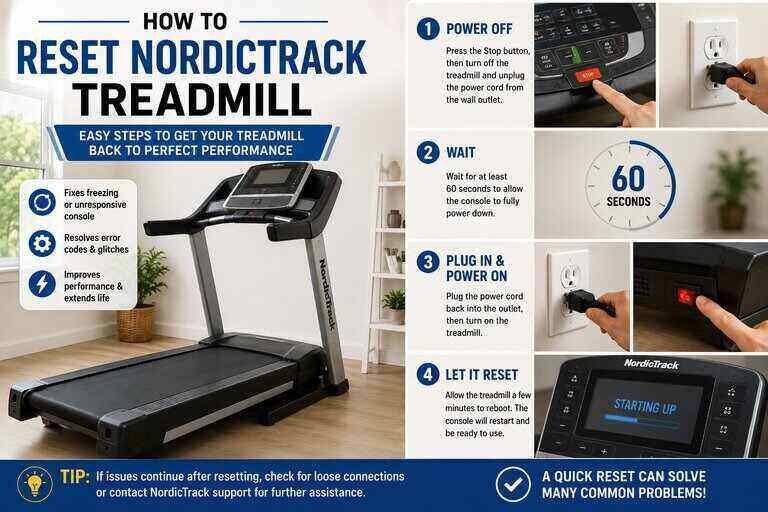
Learning how to reset nordictrack treadmill controls can save you a service call for what is often a simple glitch. A frozen console, a display stuck on zeros, or a machine that suddenly won’t power on all sound alarming. Most of these problems clear up with one of a few basic reset methods. This guide walks U.S. readers through each one, from the simplest power cycle to a full factory reset.
Key Takeaways
- “Reset” actually covers three different fixes on a NordicTrack: a power reset, a console restart, and a full factory reset.
- Most console glitches clear up after unplugging the machine for a few minutes and reinserting the safety key.
- A console reading only zeros usually points to a reed switch that has shifted out of position. It’s rarely a sign of a broken machine.
- A full factory reset uses a small pinhole on the console and a paperclip. It typically takes a second person to hold everything in place.
- NordicTrack treadmills are not designed for GFCI outlets, and forcing one can cause repeated nuisance trips.
Two Different Kinds of “Reset”
Before troubleshooting, it helps to understand that how to reset nordictrack treadmill controls actually breaks down into two separate mechanisms. Mixing them up wastes time. The first is a physical power reset button. It’s usually a small rocker switch near where the power cord enters the frame. The second is a console reset, accessed through a tiny pinhole on the display housing. Power issues call for the first. Frozen screens, iFit login loops, and firmware problems call for the second.
A third option, the full factory reset, sits above both of these. It wipes the console back to its out-of-box state. Reserve it for problems the first two methods cannot fix.
How to Turn On Your NordicTrack Treadmill
Start with the basics before assuming anything is broken. Confirm the power switch, usually located near the base of the frame, is in the “on” position. Check that the cord is fully seated in a working wall outlet. Make sure the magnetic safety key is inserted all the way into the console. If it’s already in place, pull it out and reinsert it. This alone resolves a surprising number of “dead console” complaints.
Quick Power Reset: The Circuit Breaker Button
If your console won’t light up at all, or the belt stops mid-workout, start with the power reset. This is usually the first thing to try when researching how to reset nordictrack treadmill electronics, since it fixes the largest share of sudden power problems. The button itself behaves like a small circuit breaker.
- Locate the reset switch on the frame near the power cord input.
- Switch the treadmill off completely and unplug it from the wall.
- Wait about five minutes to let the internal electronics fully discharge.
- Plug the machine back in, press the reset switch, and power it on.
Before you assume the treadmill itself is at fault, plug a different device into the same outlet to confirm it’s actually supplying power. Also check your home’s circuit breaker for a tripped switch.

Avoid GFCI Outlets
If your treadmill is plugged into a ground-fault circuit interrupter (GFCI) outlet, that alone can cause repeated, unexplained shutdowns. NordicTrack’s own support documentation notes that their treadmills are not designed to run reliably on GFCI or AFCI circuits. The motor’s normal electrical draw can trip these outlets even when nothing is actually wrong. A standard grounded outlet on a dedicated circuit is the safer choice for a treadmill.
Console Reset: Restarting the Display
A frozen or unresponsive display usually does not need the power reset button at all. Turn the treadmill off using the power switch, wait several seconds, and turn it back on. This soft reset clears most temporary glitches in the console software without touching your saved settings or workout history.
Console Reads Only Zeros? Adjust the Reed Switch
Your console may power on fine while the speed and distance never move off zero. If so, the reed switch has likely slipped out of alignment. This small sensor detects a magnet on the belt pulley to measure speed. Adjusting it is a common, easy fix rather than a sign of a failing motor.
- Unplug the treadmill completely before doing any work near the motor.
- Remove the motor hood using a Phillips screwdriver.
- Locate the reed switch on the left side of the belt pulley.
- Rotate the pulley by hand until the small magnet sits next to the switch.
- Loosen the switch’s mounting screw, without removing it, and adjust the gap to about 1/8 inch from the magnet.
- Tighten the screw and reattach the motor hood.
Incline Not Calibrating Correctly
An incline that won’t respond, or that sticks at an odd angle, usually needs a recalibration rather than a repair. The steps vary slightly by console type.
- Standard consoles: Press and hold the speed increase and stop buttons together. Insert the safety key and release both buttons. The deck will rise to its highest point and lower back down on its own to complete calibration.
- Touchscreen models: Open the settings menu and select “calibrate incline.” The machine handles the rise-and-lower process automatically.
Stay off the belt while the calibration cycle runs, since the deck moves on its own during this process.
Full Factory Reset: When Nothing Else Works
Your console might be stuck on the iFit logo, stuck in a boot loop, or simply unresponsive after the steps above. If so, a full factory reset is the last resort. This is the most involved answer to how to reset nordictrack treadmill software, so save it for problems the simpler methods can’t touch. This method applies to touchscreen models running iFit firmware version 7.1 or newer, per Garage Gym Reviews’ troubleshooting notes.
- Locate the small pinhole reset button on the side or back of the console housing, depending on your model.
- Turn the treadmill off, or unplug it entirely.
- Straighten a paperclip and insert it gently into the pinhole. Hold it in place.
- Have a second person switch the power back on while you continue holding the paperclip.
- Remove the paperclip once the screen lights up. Let the console complete its onboarding sequence, which can take 30 minutes or longer.
This particular reset does not work on older consoles without a pinhole, or on models with USB and HDMI ports. If your console lacks the pinhole entirely, check your owner’s manual for a model-specific reset path.
Watch: Resetting a NordicTrack Treadmill Console
This video shows the console reset and reboot process in action. It’s a helpful visual reference before you try it yourself.
How to Reset NordicTrack Treadmill Consoles by Model Type
The exact steps for how to reset nordictrack treadmill consoles shift depending on which console your machine shipped with. Older, non-touchscreen models generally rely on the physical power switch and reed switch adjustments described above. They don’t run the full iFit software stack. Mid-range and current touchscreen models add the console pinhole and app-pairing steps into the mix. More of their functionality lives in software rather than hardware.
Not sure which category applies? A simple LCD screen with physical buttons means the older-style process. A full-color touchscreen running iFit means the newer process, including the factory reset covered below.
Common Mistakes When Resetting a Console
- Skipping the wait time. Plugging the treadmill back in immediately after unplugging it can prevent the internal electronics from fully discharging.
- Forcing the paperclip. The pinhole button only needs a light touch. Jamming a paperclip in too hard risks damaging the console housing.
- Resetting during an incline calibration. Interrupting the automatic rise-and-lower cycle can leave the incline motor out of sync. Run calibration again from the start to fix it.
- Assuming every problem needs a factory reset. Most issues resolve with a simple power cycle. Save the full reset for stubborn boot loops or persistent freezing.
Reconnecting iFit After a Reset
A factory reset clears your paired devices, so you’ll need to reconnect iFit afterward. Open the app on your phone or tablet and log into your account. Tap the username icon in the upper corner of the console display. Then select “pair device” next to the Bluetooth icon. During the boot-up sequence, the iFit logo should appear briefly before the home screen loads normally. If pairing fails on the first try, restart both the app and the console before trying again.
When a Reset Won’t Fix the Problem
Not every issue clears up with a reset. Grinding or squealing noises are one sign. So is a belt that won’t stay centered no matter how it’s adjusted, or a motor that smells hot. These point to a mechanical problem rather than a software glitch. In these cases, resetting the console repeatedly won’t help and may delay a repair that’s actually needed. Contact NordicTrack or iFit support directly if a reset doesn’t resolve the issue after two or three attempts.
Related NordicTrack Guides
Planning to relocate the machine instead of resetting it? Our guide on how to disassemble a NordicTrack treadmill for moving covers that process step by step. Shopping for a new machine instead? Our guide to the best treadmills under $1,000 can help you compare models.
Frequently Asked Questions
What’s the fastest way to reset nordictrack treadmill controls?
A simple power cycle solves the majority of issues. Turn the machine off, unplug it for about five minutes, then plug it back in and power on.
Where is the reset button on a NordicTrack treadmill?
There are two. The power reset is a small switch near the power cord on the frame. The console reset is a tiny pinhole on the display housing, reached with a paperclip.
How long should I unplug my treadmill before resetting it?
About five minutes is usually enough to let the internal electronics fully discharge before you plug it back in.
Why does my console only show zeros?
This almost always means the reed switch near the belt pulley has shifted out of position. Adjusting the gap to about 1/8 inch from the magnet typically fixes it.
Can I plug my NordicTrack treadmill into any outlet?
Use a standard grounded outlet on its own circuit. GFCI and AFCI outlets are not recommended and can cause repeated nuisance trips.
Will a factory reset delete my workout history?
Yes. A full factory reset clears paired devices and saved settings. Back up anything important through your iFit account beforehand if possible.
My treadmill is stuck on the iFit logo. What do I do?
Try a simple power cycle first. If that fails, a full factory reset using the console pinhole usually clears a boot loop.
Do I need two people to do a factory reset?
It’s much easier with two people. One holds the paperclip in the pinhole while the other restores power to the console.
How do I recalibrate the incline?
Press and hold the speed increase and stop buttons together, then insert the safety key. The deck will rise and lower automatically to complete calibration.
Is a reset the same as a repair?
No. A reset clears software glitches and minor sensor misalignments. Grinding noises, belt slippage, or a hot-smelling motor point to a mechanical issue that needs a technician.
Does resetting the console erase my incline calibration?
A simple power cycle or console restart does not. A full factory reset can, so it’s worth recalibrating the incline afterward if it feels off.
Bottom Line
Knowing how to reset nordictrack treadmill controls starts with figuring out which of the three resets you actually need. Your options are a power cycle, a console restart, or a full factory reset. Work through them in that order, from simplest to most involved. Most console glitches, zeroed-out readings, and iFit freezes will clear up without a service call. Save the factory reset and a call to support for problems the simpler steps can’t fix.

Hi, I’m Mamon, the content creator behind this blog. I share my experience in blogging, WordPress, SEO, and affiliate marketing through honest product reviews, in-depth buying guides, and practical how-to articles. Every piece of content is thoroughly researched and written to help readers make informed decisions.
Leave a Reply